Document Upload Instructions
Notice
Phone SIM card registration requires providing double-sided identification documents of the user for registration!
If no document is uploaded, or the uploaded document is invalid, the SIM card cannot be activated. If you have any questions, feel free to contact us.
When Uploading Photos of Documents, Please Note:
- The text on the document must be complete, clear, and not blurry.
- Use your phone in horizontal mode to take the photo and ensure the document is within the four edges of the frame.
- Focus the camera while shooting and avoid glare.
- Only upload cropped images in jpg or jpeg file format.
- For each SIM card, two pages of document images must be uploaded.
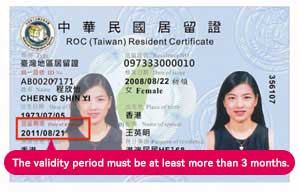
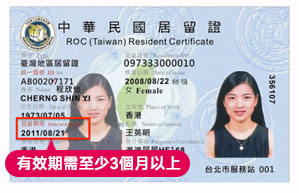
- Before uploading, confirm that your “ARC” is valid, with an expiration date of at least 3 months or more.
Taiwan Unlimited Internet SIM Card
- Primary Document:
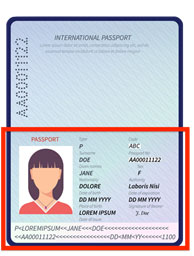
- Option 1: Passport (The secondary document can be paired with: ARC, Visa, Health Insurance Card)
- Option 2: ARC (The secondary document can be paired with: Health Insurance Card)
- Secondary Document:
- Option 1: ARC
- Option 2: Health Insurance Card
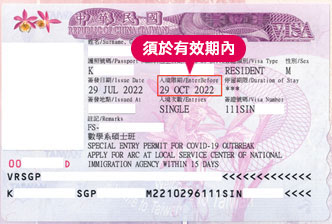
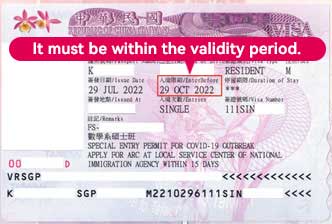
- Option 3: Visa
Taiwan Travel SIM Card
- Primary Document: Passport
- Secondary Document:
- Option 1: National ID card issued from your home country
- Option 2: Entry Permit
Option 3: Arrival Card
Passport
ARC
Visa
請注意
電話卡採實名登記,須提供使用者本人雙證件資料註冊!
如未上傳證件或上傳證件過期有誤將無法開通使用,如果您有其他疑問,歡迎與我們聯繫
當您拍攝證件時,請注意
●證件上的文字需保持完整、清晰、不模糊
●請使用手機橫向拍攝,並確認盡量貼近四周邊框
●拍攝時請聚焦證件且避免反光
●請上傳清晰圖片,上傳檔案格式必須為jpg或jpeg
●每一張電話卡請務必上傳兩張完整的證件檔案
●上傳前請先確認證件均有效,『居留證』有效日期需達3個月以上
台灣無限上網SIM卡
1.首件證件:
選項一:護照(第二證件可以搭配:居留證、簽證、健保卡)
選項二:居留證(第二證件可以搭配:健康保險卡)
2.第二證件:
選項一:居留證
選項二:健康保險卡
選項三:簽證(VISA)
台灣旅遊上網SIM卡
1.首件證件:護照
2.第二證件:
選項一:當地國身分證
選項二:登機證
選項三:入台證
護照
居留證
簽證